Securing your JSON Web Tokens the correct way.

I am a Software developer with a love for OpenSource, Networking, Cloud and electronics. I work at Grace Health.
I am proficient as a Backend Engineer with the following Languages: NodeJS, Typescript, GoLang, Python. Cloud services: Heroku, AWS, Azure
What is a JSON Web Token and how does it work?
JSON Web Token is a very popular method of keeping sessions in web applications. The flow of implementation is simple and straightforward. However, are your JSON Web Tokens really secured? Are your payloads safe from the prying eyes of hackers? Well, let's find out.
JSON Web Tokens are a stateless solution for authentication. There is no need to store any session state on the server. This makes it perfect for restful APIs as Restful APIs should always be stateless. So, how does a basic JWT authentication work?
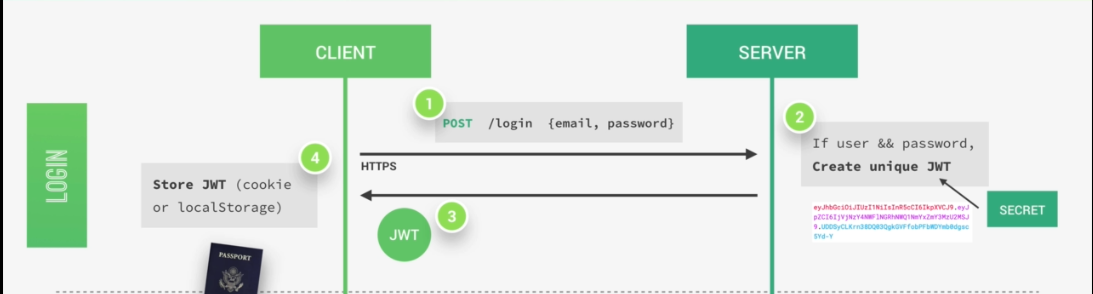
A user initiates a sign-in with their credentials. After a successful sign-in, a token is generated for the user. This token is like a time bound pass to access protected routes/data.
The user attaches the token to every subsequent request requiring authentication. On receiving the request and the token, the server decodes and verifies that the token is valid and that the user is who he claims to be.
If the user is to have access, access is granted based on his JWT "pass".
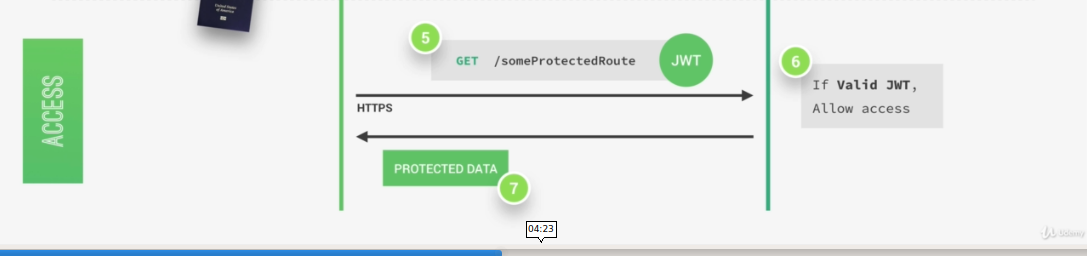 The issue begins when someone lays their hands on that pass. What could they do with it? Depending on what you put inside your token and how your system is built, I'd say not much. Let's visit jwt.io, an online debugger of JWT and let us try decoding a test token.
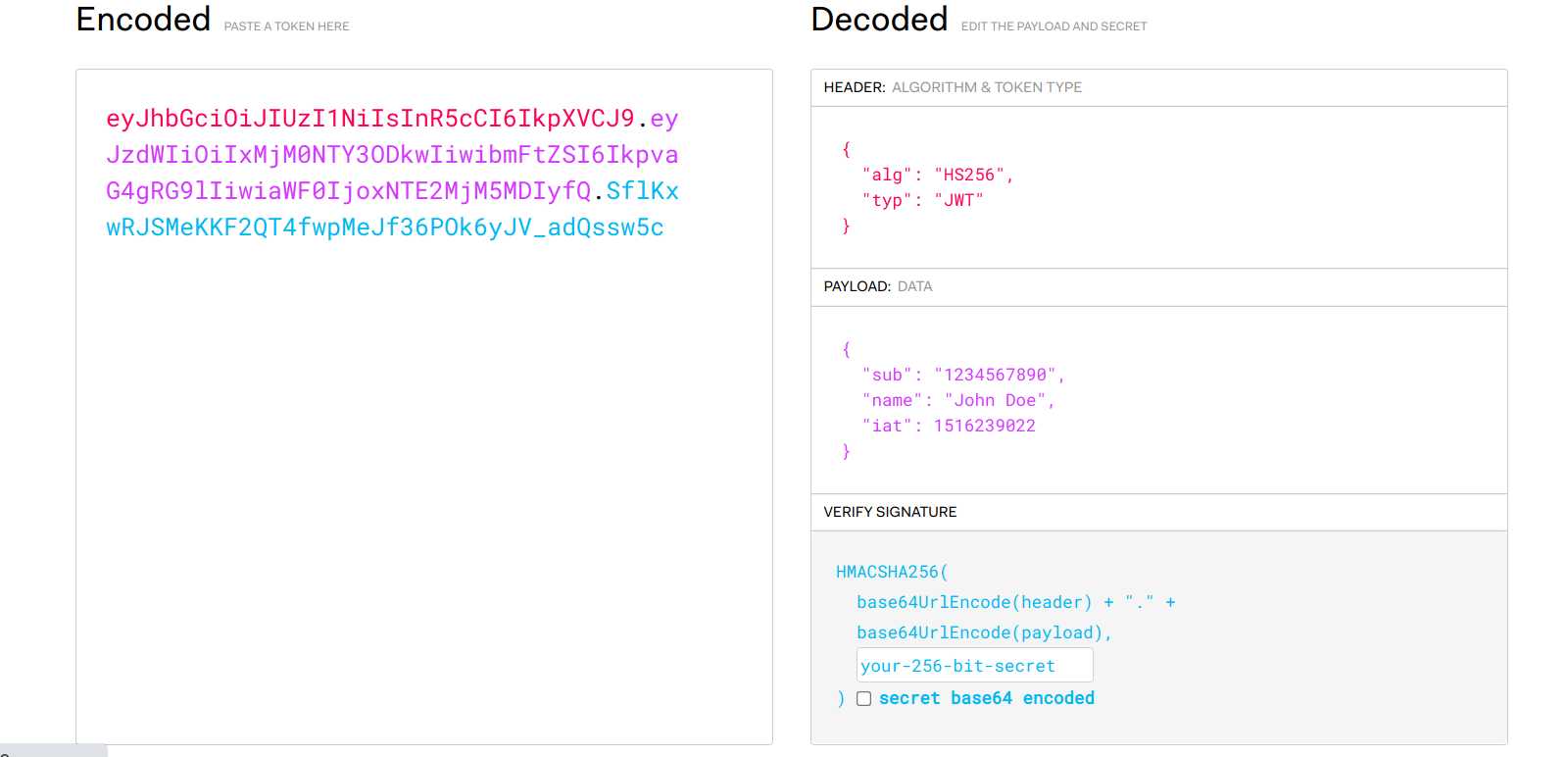 The token was decoded in an instant. Wow, and there goes the security of a lot of websites. 😅😅.

Essentially, a JWT encoding string consist of three parts. The header, the payload and the signature. These parts are colour coded to match their decoded output. The header contains some information about the token. Information such as the date it was issued and the encoding algorithm. The payload is the data that we encode into the token. This can be any data at all. The important thing to note is that these two parts are encoded and not encrypted. Meaning that anyone will be able to decode them and to read them. This is why you shouldn't store any sensitive data (eg. password, credit card number) on it. However, this isn't much of a problem though as the third part of the token, the signature, takes care of it.
The signature is created with the header, the payload and a secret from the issuer using a signing algorithm. The signature is unique and only one combination of header + payload + secret will produce that signature. This process is called signing the JSON Web Token. The header, the payload and this signature forms the JWT, which is sent to the client.
Whenever a server receives a JWT to access a protected route, the server verifies that the header and the payload data of the token as originally created is untampered. This is done by comparing the signature that comes with the token to the signature that is generated with the secret key on the server at that instant. If it matches, it is a valid JWT. If it doesn't match, we call the police 🚔🚔🚔.
So, How do we generate an encrypted JWT?
If you're someone that doesn't want anyone looking into your payloads or you have this crazy obsession with storing users passwords or credit card details in your tokens (Seriously, don't!!!!!), you would prefer going for the encrypted kind of JWT. This is perfect for this use case as by default, no one can see the contents of your tokens. No one but he that possesses the key. I'll be showing you how to go about that in few simple steps.
Foremost, ensure that you have nodejs and npm installed on your laptop.
- We create a new folder and initialise a project. This can be done with the following snippet.
mkdir encryptedJWT
cd encryptedJWT
npm init -y
- We'll need to install the library to handle all the hard work for us. This is done with the following.
npm add jose
After this is done, we create and open a file named index.js in our IDE of choice. The code goes as follows.
let crypto = require('crypto');
const { EncryptJWT } = require('jose/jwt/encrypt');
const { jwtDecrypt } = require('jose/jwt/decrypt');

let secret = 'my_secret_key';

/*
Generate 32 Byte key from plain text secret
in 2000 iterations using sha512 */

let secretKey = crypto.pbkdf2Sync(secret, 'salt', 2000, 32, 'sha512');

let TestFuction = async () => {
    /* Encrypt JWT with payload
    { name: "Taiwo Hassan", id: "12" }
    */
    const jwt = await new EncryptJWT(
        {
            name: "Taiwo Hassan",
            id: "12"
        }
    )
        //use AES-256 GCM for encryption
        .setProtectedHeader({ alg: 'dir', enc: 'A256GCM' })
        .setIssuedAt()
        .setExpirationTime('2h')
        .encrypt(secretKey)

    /* Display Encrypted JWT*/
    console.log("Encrypted JWT:", jwt);

    /* Decrypting The JWT */
    const { payload, protectedHeader } = await jwtDecrypt(jwt, secretKey);

    /* Display Decrypted JWT*/
    console.log("Header:", protectedHeader);
    console.log("Decrypted JWT:", payload);
}

TestFuction();
The code is simple, straight-forward and pretty self-explanatory. We can go ahead and run our code with node index.js. If all goes as expected, you should have something like the one displayed below.

Before we start celebrating, lets visit jwt.io to ensure that our token is indeed encrypted. After pasting the token from the previous step, the website is unable to decode to token. This is shown below.
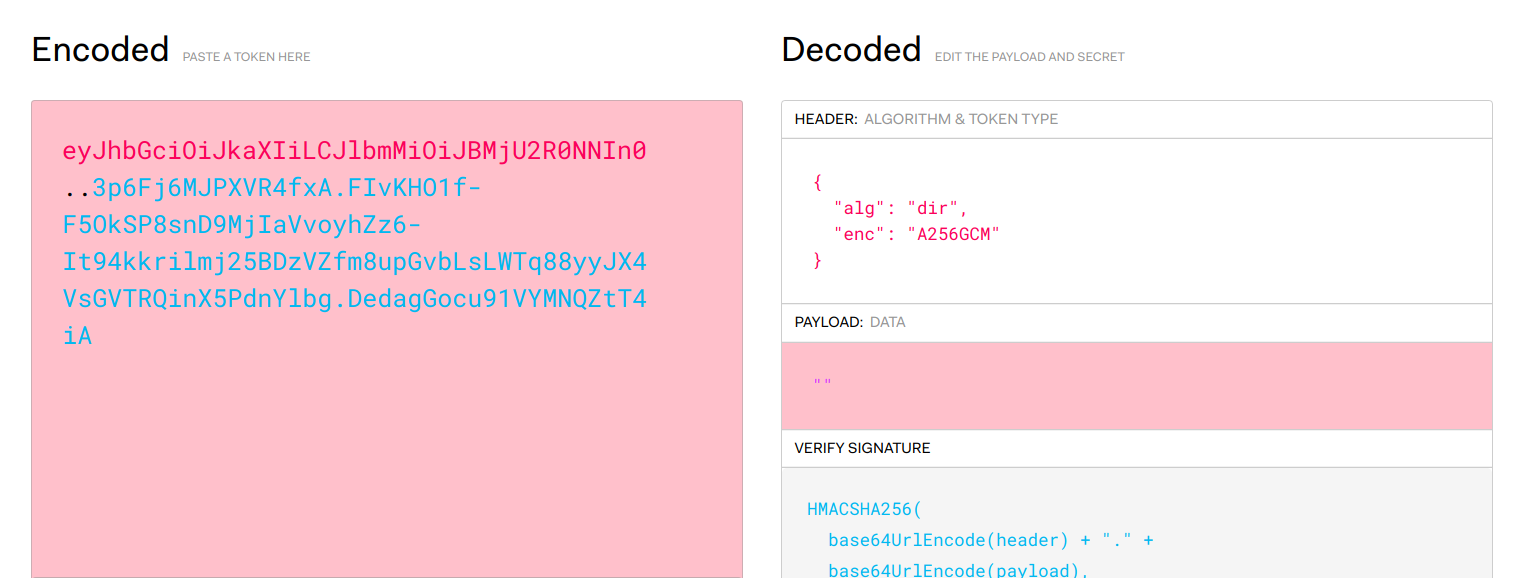 This shows that no one is able to decode your token without your secret key. How's that for a superpower???

The code used in this article can be found at my github repository. You can also find more details about the library used at its official repository on Github. Have fun.


